
Last Updated May 19, 2026
Cognition in human-computer interaction examines how cognitive processes such as perception, attention, memory, working memory, mental models, decision making, trust, and learning shape the way people interact with digital systems. In cognitive psychology, human-computer interaction provides a framework for understanding how users process information in technologically mediated environments and how interfaces can be designed to align with human cognitive capabilities, limitations, and responsibilities.
Human-computer interaction is not only a design field or a software-usability practice. It is also a cognitive science of action in digital environments. Every interface asks users to perceive signals, allocate attention, remember procedures, interpret feedback, build expectations, make choices, recover from errors, and decide whether to trust what a system is doing. When an interface is well designed, this cognitive work becomes supported, visible, and manageable. When an interface is poorly designed, the system shifts hidden cognitive burden onto the user.
HCI draws directly on attention, perception, memory, working memory, mental models, decision making, cognitive load, and behavioral economics. The field was strongly shaped by classic cognitive work such as Card, Moran, and Newell’s The Psychology of Human-Computer Interaction, which helped establish HCI as an interdisciplinary field connecting cognitive psychology, computer science, design, engineering, and human factors.
Main Library
Publications
Article Map
Cognitive Psychology
Related Topic
Artificial Intelligence Systems
Related Topic
Data Systems & Analytics
Related Topic
Embedded & Edge Systems
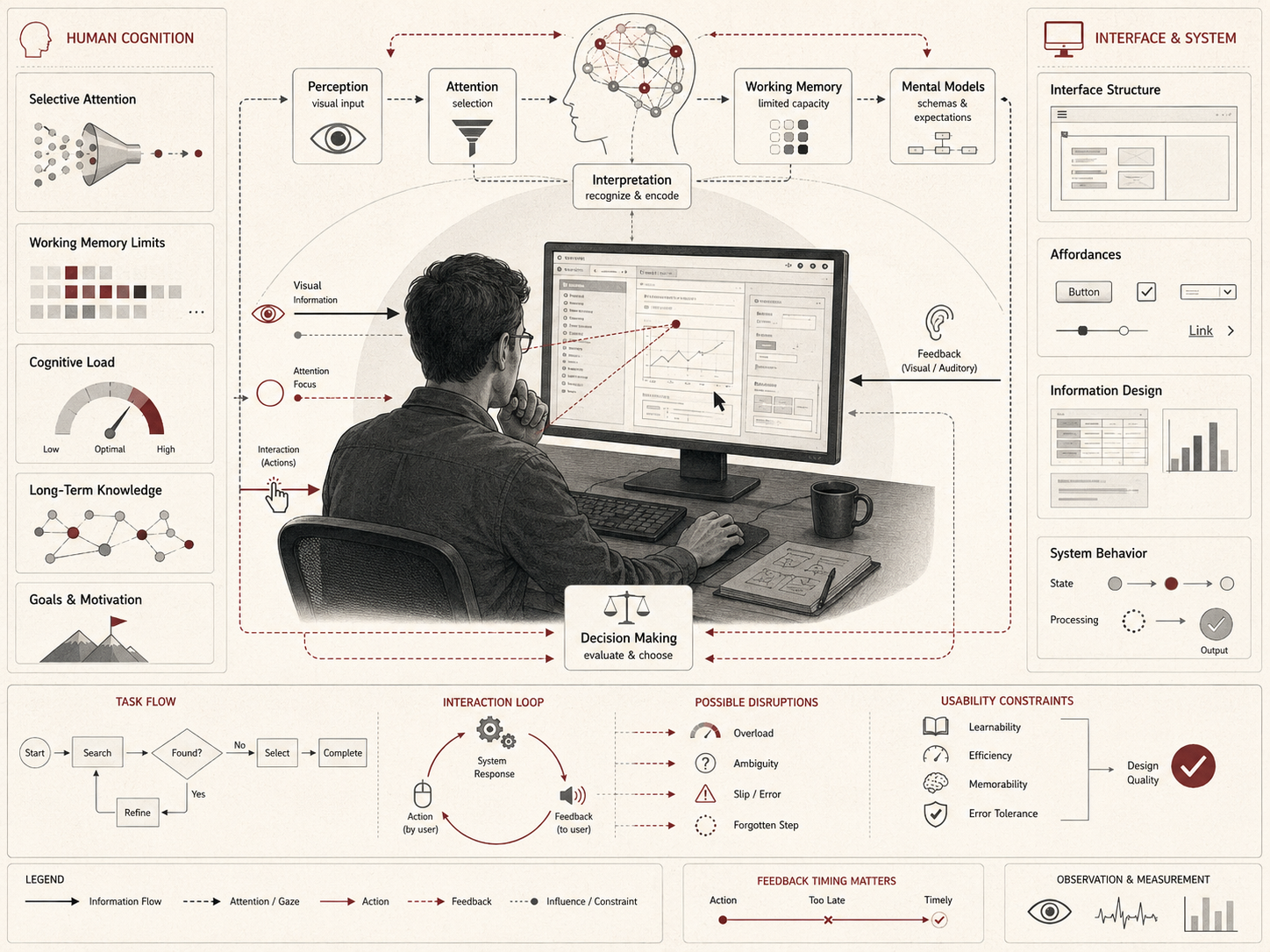
As digital systems become embedded in work, education, healthcare, finance, public services, scientific research, media, and everyday social life, understanding the cognitive foundations of interaction becomes more important, not less. Interfaces are not neutral surfaces placed on top of systems. They are environments that structure perception, memory, attention, judgment, and action.
Cognitive foundations of human-computer interaction
Human-computer interaction is grounded in the recognition that human cognition is limited, structured, selective, embodied, and context-sensitive. Users do not process information in an unlimited or neutral way. They rely on perceptual systems that highlight some features over others, attentional systems that can manage only a fraction of available input, and memory systems that constrain how much information can be held, manipulated, and retrieved at once.
These cognitive realities include:
- limited attentional capacity, which constrains how much users can notice and process at one time;
- restricted working-memory resources, which limit how much task state users can actively maintain;
- selective perception, which shapes what users see, miss, group, or misinterpret;
- mental models, which guide expectations about how a system works;
- heuristic judgment, which influences how users make choices under time pressure;
- feedback dependence, which affects how users know whether their actions succeeded or failed.
Designing effective systems therefore requires more than technical functionality. It requires alignment with the way cognition actually works. A technically powerful system can fail if users cannot interpret it, trust it appropriately, recover from errors, or understand what actions are available. Conversely, a well-designed interface can extend human cognition by making complex tasks more visible, structured, and manageable.
This is why HCI belongs inside cognitive psychology. It studies cognition not only inside the laboratory, but inside the designed environments where people now work, learn, communicate, search, decide, and act.
Perception and interface design
Perception determines how users detect, organize, and interpret the information presented by an interface. Layout, contrast, grouping, hierarchy, spacing, motion, iconography, typography, timing, and visual density all influence whether information is noticed quickly, misread, or missed entirely.
This makes perceptual design central to usability. A visually cluttered interface imposes extra interpretive effort before higher-order reasoning can begin. Users must search for relevant information, separate signal from noise, infer structure, and reconstruct the logic of the task. A clear interface reduces unnecessary perceptual work by making structure visible.
These dynamics are closely related to perception, where raw sensory input is transformed into meaningful representation. In HCI, good design uses perceptual organization to reduce avoidable cognitive effort. Grouped controls, clear labels, consistent icons, meaningful contrast, readable type, and spatial hierarchy all help users understand what matters.
Perceptual design also has ethical implications. Information can be made visible or hidden. Warnings can be made salient or easy to ignore. Defaults can be emphasized. Costs can be obscured. Consent can be made clear or buried. Dark patterns often work by exploiting perception, attention, and decision processes in ways that serve the system owner rather than the user.
Good interface design therefore asks not only whether users can see something, but whether they can perceive its meaning accurately under real conditions of time pressure, distraction, fatigue, stress, disability, and unequal familiarity with technology.
Attention and cognitive load
Attention is a scarce resource in digital environments. Interfaces compete for it, divide it, capture it, and sometimes exhaust it. Notifications, modal interruptions, visual clutter, advertising, infinite scroll, fragmented workflows, multi-step authentication, alert fatigue, and unnecessary status changes can all reduce a user’s ability to sustain task-relevant processing.
This means that interface design must actively manage attentional demand rather than treating attention as infinitely available. When too much competes at once, users become slower, more error-prone, and more reliant on superficial cues, habits, defaults, or automation. Under high cognitive load, users are less likely to read carefully, compare options, remember prior steps, detect inconsistencies, or notice warnings.
These dynamics connect directly to attention and cognitive load. Effective systems protect user attention, reduce irrelevant interference, and make task structure more transparent. They guide attention without manipulating it. They distinguish urgent signals from routine information. They reduce the burden of monitoring when the user’s main task requires focus elsewhere.
Attentional design is especially important in high-stakes systems. In medical interfaces, cockpit systems, public-benefits portals, financial dashboards, emergency-management platforms, laboratory tools, and industrial control systems, missed signals can have serious consequences. A design that looks efficient during demonstration may fail under fatigue, workload, interruptions, or uncertainty.
The goal is not to remove all complexity. Complex tasks sometimes require complex interfaces. The goal is to prevent avoidable cognitive load from being mistaken for necessary expertise.
Memory and interaction
Memory plays a central role in HCI because interaction often depends on remembering commands, locations, meanings, procedures, constraints, prior choices, and task state. Interfaces that depend heavily on recall impose greater cognitive burden than those that support recognition, consistency, and visible structure.
This distinction has long been central in design thinking. Users generally perform better when systems make options, states, and paths visible rather than requiring them to remember them from elsewhere. Memory-supportive design reduces the burden on working memory and strengthens usability.
Common memory-supportive design features include:
- visible system status, so users do not have to remember what state the system is in;
- consistent navigation, so users can transfer learning across pages and tasks;
- progress indicators, so users understand where they are in a process;
- clear labels, so users do not have to infer meaning from memory;
- undo and recovery paths, so users can act without excessive fear of irreversible error;
- persistent context, so users can return to tasks without reconstructing everything from scratch.
Memory demands become especially important in complex workflows. A user filling out a government form, configuring a medical device, managing a financial account, analyzing scientific data, or coordinating a logistics system may need to preserve information across screens, sessions, documents, and decisions. Poor interface memory support forces the user to become the system’s working memory.
Good HCI design externalizes memory in useful ways. It lets the interface hold structure so the user can focus on understanding, judgment, and action.
Mental models and system understanding
Users develop mental models of how systems work. These internal representations guide action and shape expectations about what will happen when a button is pressed, a workflow is initiated, a setting is changed, a file is saved, or an automated recommendation is accepted.
When a system aligns with a user’s mental model, interaction feels intuitive. When it conflicts with that model, users become confused, hesitant, or error-prone. For this reason, interface design is not only about presenting options clearly. It is also about communicating system structure in ways users can understand and predict.
Mental-model mismatch is one of the most important sources of interaction error. A user may believe a document is saved when it is not. A patient may assume a portal message reached a clinician when it only entered a queue. A worker may believe an automated recommendation is advisory when the institution treats it as determinative. A citizen may think an online form was submitted when a hidden validation error prevented completion.
These errors are not simply user mistakes. They often reveal failures of system communication. Interfaces teach users how the system works, whether designers intend them to or not. Labels, feedback, affordances, constraints, animation, error messages, and workflow structure all shape the user’s mental model.
Good HCI becomes cognitively powerful when it helps users build accurate internal models rather than forcing them to guess at hidden structure.
Decision making in digital environments
Interaction with digital systems frequently involves decision making under uncertainty. Users must choose actions, interpret incomplete feedback, assess risk, evaluate options, and determine whether a path is reversible, safe, legitimate, or worth pursuing.
These decisions are shaped by decision making and by the broader findings of behavioral economics, including framing effects, default bias, anchoring, salience, loss aversion, choice overload, and heuristic choice under cognitive strain. Interfaces do not merely present neutral options. They shape the conditions under which choices are interpreted and made.
This is why structure, defaults, warning design, consent flows, recommendation ranking, and information sequencing matter so much in digital systems. The architecture of the interface becomes part of the architecture of the decision itself. A default can become a choice. A warning can become background noise. A recommendation can become authority. A hidden cost can become a manipulation.
Decision design is especially important when users face unequal expertise or power. A person applying for benefits, accepting loan terms, consenting to data use, choosing medical options, or responding to automated scoring may not have the time, knowledge, or bargaining power to evaluate every implication. In these contexts, HCI design can either protect user agency or exploit cognitive limitation.
Cognitive HCI therefore treats digital choice architecture as a serious design and ethics problem. Good interfaces help users make informed decisions. Poor interfaces make decisions appear simpler than they are or harder than they need to be.
Formalizing HCI: information, cost, and cognitive alignment
HCI can be represented formally as a relation between user state, interface structure, and task demands. Let the user’s cognitive state at time \(t\) be \(U_t\), the interface state be \(I_t\), and the task goal be \(G\). Interaction can be described as a sequence of updates:
U_{t+1} = f(U_t, I_t, G)
\]
Interpretation: The user’s next cognitive state depends on the current user state, the interface state, and the task goal. Interaction is therefore a dynamic feedback process, not a one-way display of information.
One useful abstraction is to represent total interaction cost as the sum of perceptual, attentional, memory, and decision burdens:
C_{\text{total}} = C_p + C_a + C_m + C_d
\]
Interpretation: Total interaction cost combines perceptual cost, attentional cost, memory cost, and decision cost. Better design reduces unnecessary cost without hiding information the user needs.
Task success can also be modeled probabilistically as a function of the difference between available cognitive capacity and imposed demand:
Pr(\text{success}) = \frac{1}{1 + e^{-(\beta_0 + \beta_1(K – L))}}
\]
Interpretation: As usable cognitive capacity \(K\) exceeds imposed load \(L\), task success becomes more likely. When interface demand exceeds what users can comfortably process, accuracy and efficiency deteriorate.
Mental-model alignment can also be represented as an error term between system structure \(S\) and user model \(\hat{S}\):
\epsilon = \| S – \hat{S} \|
\]
Interpretation: Mental-model error increases as the user’s understanding of the system diverges from the system’s actual structure.
As mismatch increases, users are more likely to hesitate, mispredict system behavior, make avoidable errors, overtrust automation, or abandon the task. This formalization helps express why communicative design matters: a usable system is not only functional, but cognitively legible.
Usability, efficiency, and cognitive alignment
Usability refers to how effectively, efficiently, and satisfactorily users can achieve goals within a system. Cognitive alignment is one of its central conditions. Systems that align with perception, memory, attention, and decision processes reduce friction and improve performance.
Systems that are cognitively aligned tend to:
- reduce avoidable user error;
- increase task efficiency without sacrificing comprehension;
- support faster learning and transfer across workflows;
- make system status and available actions visible;
- reduce unnecessary cognitive load;
- support accurate mental models;
- improve calibrated trust and appropriate reliance.
The basic design lesson is straightforward: digital systems work better when they fit the structure of the mind that must use them. But this does not mean design should simply feel easy. Some systems need to slow users down, make consequences visible, or interrupt risky action. Good usability is not always maximum speed. It is the right cognitive support for the task, risk, and user population.
A banking transfer, a medication order, a public-benefits appeal, a climate-risk dashboard, and a social-media post do not require the same interaction pattern. The cognitive demands of the task should determine the design, not a generic preference for simplicity.
Accessibility, unequal cognitive burden, and inclusive design
Accessibility is central to cognitive HCI because interfaces do not impose the same burden on all users. Differences in vision, hearing, motor control, language, literacy, neurodiversity, age, stress, fatigue, disability, device access, bandwidth, and prior experience can all change how an interface is perceived and used.
An interface that appears usable for a technically confident user in a controlled test may be cognitively punishing for someone using a phone, translating instructions, managing anxiety, working under time pressure, or navigating a disability. Average usability results can therefore conceal unequal cognitive burden.
Inclusive design asks whether systems support heterogeneous users rather than only idealized users. This includes clear language, keyboard navigation, screen-reader compatibility, sufficient contrast, predictable structure, error prevention, recovery paths, flexible timing, consistent navigation, and avoidance of unnecessary memory demands.
Accessibility should not be treated as a compliance layer added after design. It is a test of whether the system respects human cognitive diversity. A system that is accessible is often better for everyone because it makes structure clearer, reduces unnecessary effort, and supports interaction under real-world conditions.
Cognitive HCI therefore connects accessibility to justice. Poor design can exclude people from services, work, education, healthcare, finance, and civic participation. Better design can reduce those barriers by treating cognitive burden as a public and institutional responsibility rather than a private failure of the user.
Human-computer interaction in complex systems
As systems become more complex, the importance of cognitive design increases. In healthcare, finance, aviation, education, infrastructure, sustainability-related systems, research platforms, and public administration, interaction errors can have significant consequences. Poor design can distort reasoning, hide relevant signals, increase risk, or delay critical action.
Complex systems often require users to monitor multiple indicators, understand dependencies, manage uncertainty, coordinate with other people, and act under time pressure. The interface becomes a cognitive map of the system. If that map is incomplete, misleading, cluttered, or poorly sequenced, the user’s reasoning is distorted.
These concerns are closely related to problem solving in complex environments, where representation, strategy, feedback, and working-memory limits all matter. Good HCI helps users reason through complexity by externalizing structure, preserving context, highlighting anomalies, and making consequences interpretable.
The goal is not to reduce every complex system to a simple screen. The goal is to design interfaces that make complexity navigable, accountable, and cognitively tractable.
Artificial intelligence and adaptive interfaces
Advances in artificial intelligence are transforming HCI by enabling adaptive interfaces that respond to user behavior, personalize workflows, anticipate needs, summarize information, recommend actions, and dynamically reconfigure interaction. These systems can reduce effort and improve efficiency, but they also create new risks.
Adaptive systems may introduce opacity, over-automation, misplaced trust, attentional fragmentation, or new forms of cognitive overload if their behavior is difficult to predict. A system that changes itself may be harder for users to form a stable mental model of. A recommendation system may appear helpful while narrowing attention. An AI assistant may reduce drafting effort while increasing the burden of verification.
This means that AI in HCI increases rather than eliminates the need for cognitive design. AI interfaces must be explainable enough to support user judgment, transparent enough to preserve agency, and calibrated enough to prevent blind trust. They should make uncertainty visible and preserve the user’s ability to inspect, override, and correct system behavior.
The integration of cognitive psychology and AI therefore raises a central design challenge: systems must become more powerful without becoming less understandable. A good AI interface should not simply automate the user out of the loop. It should support better human cognition where human responsibility remains necessary.
Contemporary research and interdisciplinary integration
Modern HCI research integrates cognitive psychology, computer science, design, human factors, accessibility studies, data science, artificial intelligence, sociology, anthropology, ethics, and public-interest technology. ACM SIGCHI describes itself as a leading international community for research, education, and practical applications in human-computer interaction. The CHI conference series remains one of the central venues for HCI research and practice.
At the same time, broader educational, design, and research communities continue to frame HCI as a multidisciplinary field concerned with how technology should be designed around human use rather than only around technical possibility. This interdisciplinary integration keeps the field connected to both cognitive science and real-world system design.
Contemporary HCI also faces new responsibilities. Digital systems now mediate healthcare access, public benefits, workplace monitoring, education, political communication, platform governance, AI-assisted decision making, and social participation. HCI research must therefore evaluate not only efficiency and satisfaction, but also trust, accountability, accessibility, user autonomy, institutional power, and unequal burden.
HCI remains one of the clearest places where cognitive psychology becomes operational in the built digital world. It turns theories of perception, attention, memory, mental models, and decision making into design questions that affect how people live and act.
R code for HCI data
The following R workflow illustrates analyses relevant to HCI, including task success, response latency, cognitive load, error count, warning detection, accessibility friction, and mental-model alignment in interface studies.
# Install packages if needed:
# pak::pak(c("tidyverse", "lme4", "lmerTest", "emmeans", "broom.mixed"))

library(tidyverse)
library(lme4)
library(lmerTest)
library(emmeans)
library(broom.mixed)

# Expected columns:
# participant, interface_condition, task_id, task_difficulty,
# perceptual_load, attentional_demand, working_memory_load,
# cognitive_load, alignment_score, trust_score,
# automation_reliance, accessibility_friction,
# success, response_time_ms, error_count, warning_detected

dat <- read_csv("hci_trials.csv") %>%
  mutate(
    participant = factor(participant),
    interface_condition = factor(interface_condition),
    task_id = factor(task_id),
    success = as.integer(success),
    warning_detected = as.integer(warning_detected),
    log_response_time = log(response_time_ms)
  )

# -----------------------------
# 1. Descriptive profile
# -----------------------------

condition_summary <- dat %>%
  group_by(interface_condition) %>%
  summarise(
    n_trials = n(),
    participants = n_distinct(participant),
    mean_task_difficulty = mean(task_difficulty, na.rm = TRUE),
    mean_perceptual_load = mean(perceptual_load, na.rm = TRUE),
    mean_attention = mean(attentional_demand, na.rm = TRUE),
    mean_working_memory = mean(working_memory_load, na.rm = TRUE),
    mean_cognitive_load = mean(cognitive_load, na.rm = TRUE),
    mean_alignment = mean(alignment_score, na.rm = TRUE),
    mean_trust = mean(trust_score, na.rm = TRUE),
    mean_accessibility_friction = mean(accessibility_friction, na.rm = TRUE),
    success_rate = mean(success, na.rm = TRUE),
    warning_detection_rate = mean(warning_detected, na.rm = TRUE),
    mean_errors = mean(error_count, na.rm = TRUE),
    mean_response_time_ms = mean(response_time_ms, na.rm = TRUE),
    .groups = "drop"
  )

print(condition_summary)

# -----------------------------
# 2. Task-success model
# -----------------------------

success_model <- glmer(
  success ~
    interface_condition +
    task_difficulty +
    perceptual_load +
    attentional_demand +
    working_memory_load +
    cognitive_load +
    alignment_score +
    trust_score +
    accessibility_friction +
    (1 | participant),
  data = dat,
  family = binomial(),
  control = glmerControl(optimizer = "bobyqa")
)

summary(success_model)
emmeans(success_model, ~ interface_condition, type = "response")

# -----------------------------
# 3. Response-time model
# -----------------------------

rt_model <- lmer(
  log_response_time ~
    interface_condition +
    task_difficulty +
    perceptual_load +
    attentional_demand +
    working_memory_load +
    cognitive_load +
    alignment_score +
    accessibility_friction +
    (1 | participant),
  data = dat,
  REML = FALSE
)

summary(rt_model)
anova(rt_model)

# -----------------------------
# 4. Error-count model
# -----------------------------

error_model <- glmer(
  error_count ~
    interface_condition +
    task_difficulty +
    perceptual_load +
    attentional_demand +
    working_memory_load +
    cognitive_load +
    alignment_score +
    accessibility_friction +
    (1 | participant),
  data = dat,
  family = poisson(),
  control = glmerControl(optimizer = "bobyqa")
)

summary(error_model)
emmeans(error_model, ~ interface_condition, type = "response")

# -----------------------------
# 5. Warning-detection model
# -----------------------------

warning_model <- glmer(
  warning_detected ~
    interface_condition +
    perceptual_load +
    attentional_demand +
    cognitive_load +
    alignment_score +
    trust_score +
    (1 | participant),
  data = dat,
  family = binomial(),
  control = glmerControl(optimizer = "bobyqa")
)

summary(warning_model)
emmeans(warning_model, ~ interface_condition, type = "response")

# -----------------------------
# 6. Visualization
# -----------------------------

ggplot(dat, aes(x = cognitive_load, y = error_count, color = interface_condition)) +
  geom_point(alpha = 0.25) +
  geom_smooth(method = "glm", method.args = list(family = "poisson"), se = FALSE) +
  labs(
    title = "Cognitive load and interaction error",
    x = "Cognitive load",
    y = "Error count"
  ) +
  theme_minimal()
This workflow can be adapted for usability tests, interface-comparison experiments, accessibility evaluations, AI-interface studies, high-risk workflow audits, or mixed-methods HCI research. In applied settings, the most important step is careful construct design: defining what counts as success, error, cognitive load, accessibility friction, trust, and mental-model alignment for the actual interface and user population being studied.
Python code for HCI data
The Python workflow below parallels the R analysis and is useful for interface-comparison studies, workload analysis, usability experiments, accessibility evaluations, and AI-assisted interface research.
import numpy as np
import pandas as pd
import statsmodels.formula.api as smf
import statsmodels.api as sm
import matplotlib.pyplot as plt

# Expected columns:
# participant, interface_condition, task_id, task_difficulty,
# perceptual_load, attentional_demand, working_memory_load,
# cognitive_load, alignment_score, trust_score,
# automation_reliance, accessibility_friction,
# success, response_time_ms, error_count, warning_detected

df = pd.read_csv("hci_trials.csv")

categorical_cols = ["participant", "interface_condition", "task_id"]
for col in categorical_cols:
    df[col] = df[col].astype("category")

df["success"] = df["success"].astype(int)
df["warning_detected"] = df["warning_detected"].astype(int)
df["log_response_time"] = np.log(df["response_time_ms"])

# -----------------------------
# 1. Descriptive profile
# -----------------------------

condition_summary = (
    df.groupby("interface_condition")
    .agg(
        n_trials=("success", "size"),
        participants=("participant", "nunique"),
        mean_task_difficulty=("task_difficulty", "mean"),
        mean_perceptual_load=("perceptual_load", "mean"),
        mean_attention=("attentional_demand", "mean"),
        mean_working_memory=("working_memory_load", "mean"),
        mean_cognitive_load=("cognitive_load", "mean"),
        mean_alignment=("alignment_score", "mean"),
        mean_trust=("trust_score", "mean"),
        mean_accessibility_friction=("accessibility_friction", "mean"),
        success_rate=("success", "mean"),
        warning_detection_rate=("warning_detected", "mean"),
        mean_errors=("error_count", "mean"),
        mean_response_time_ms=("response_time_ms", "mean"),
    )
    .reset_index()
)

print(condition_summary)

# -----------------------------
# 2. Task-success model
# -----------------------------

success_model = smf.glm(
    "success ~ interface_condition + task_difficulty + perceptual_load "
    "+ attentional_demand + working_memory_load + cognitive_load "
    "+ alignment_score + trust_score + accessibility_friction",
    data=df,
    family=sm.families.Binomial(),
)

success_result = success_model.fit(
    cov_type="cluster",
    cov_kwds={"groups": df["participant"]},
)

print(success_result.summary())

# -----------------------------
# 3. Response-time model
# -----------------------------

rt_model = smf.ols(
    "log_response_time ~ interface_condition + task_difficulty + perceptual_load "
    "+ attentional_demand + working_memory_load + cognitive_load "
    "+ alignment_score + accessibility_friction",
    data=df,
)

rt_result = rt_model.fit(
    cov_type="cluster",
    cov_kwds={"groups": df["participant"]},
)

print(rt_result.summary())

# -----------------------------
# 4. Error-count model
# -----------------------------

error_model = smf.glm(
    "error_count ~ interface_condition + task_difficulty + perceptual_load "
    "+ attentional_demand + working_memory_load + cognitive_load "
    "+ alignment_score + accessibility_friction",
    data=df,
    family=sm.families.Poisson(),
)

error_result = error_model.fit(
    cov_type="cluster",
    cov_kwds={"groups": df["participant"]},
)

print(error_result.summary())

# -----------------------------
# 5. Warning-detection model
# -----------------------------

warning_model = smf.glm(
    "warning_detected ~ interface_condition + perceptual_load "
    "+ attentional_demand + cognitive_load + alignment_score + trust_score",
    data=df,
    family=sm.families.Binomial(),
)

warning_result = warning_model.fit(
    cov_type="cluster",
    cov_kwds={"groups": df["participant"]},
)

print(warning_result.summary())

# -----------------------------
# 6. Visualization
# -----------------------------

fig, ax = plt.subplots(figsize=(8, 5))

for condition, group in df.groupby("interface_condition"):
    ax.scatter(
        group["cognitive_load"],
        group["error_count"],
        alpha=0.35,
        label=str(condition),
    )

ax.set_xlabel("Cognitive load")
ax.set_ylabel("Error count")
ax.set_title("Cognitive load and interaction error")
ax.legend(title="Interface condition")
plt.tight_layout()
plt.show()
The Python workflow is intentionally transparent and adaptable. It can be extended with mixed-effects models, Bayesian models, eye-tracking features, clickstream data, accessibility metrics, warning-response analysis, survival models for task abandonment, or trust-calibration analysis for AI-assisted interfaces.
GitHub Repository
The companion repository provides reusable code and research scaffolding for studying cognition in human-computer interaction, including workflows for interface comparison, cognitive-load modeling, task-success analysis, error-count modeling, warning-detection analysis, accessibility-friction evaluation, and interaction-cost simulation.
Complete Code Repository
Access the full companion repository for this article, including reproducible analysis materials and multi-language code workflows for cognitive HCI research.
Applications of cognitive HCI research
Cognitive HCI research matters across education, productivity software, healthcare systems, finance, public-service platforms, accessibility design, industrial interfaces, scientific software, civic technology, research tools, AI-assisted systems, and safety-critical environments. It helps explain why some systems feel intuitive while others are error-prone, cognitively noisy, exclusionary, or difficult to trust.
In education, cognitive HCI can improve learning platforms by reducing unnecessary load and supporting attention. In healthcare, it can reduce medication-ordering errors, improve patient portals, and make clinical decision support more interpretable. In public services, it can reduce barriers to benefits, forms, appeals, and civic participation. In scientific research, it can help make data platforms, analysis workflows, and computational tools more usable and reproducible.
AI-assisted interfaces make these questions more urgent. As systems begin to summarize, recommend, predict, and automate, users must decide when to trust them, when to question them, and how to understand their limits. Cognitive HCI provides the tools for evaluating not only what the system can do, but whether people can use it responsibly.
These applications matter because digital systems increasingly shape how people reason, choose, learn, and act. Designing them well is therefore partly a cognitive task and partly an ethical responsibility.
Conclusion
Cognition in human-computer interaction concerns the way perception, attention, memory, working memory, mental models, and decision processes shape interaction with digital systems. It shows that usability is not merely a technical property of software or devices, but a relation between interface structure and the cognitive architecture of the user.
Cognitive psychology makes HCI more than interface styling or convenience. It turns HCI into a science of alignment between human mental processes and digital environments. Understanding that alignment helps explain how systems become usable, learnable, efficient, accessible, trustworthy, and accountable under real conditions of cognitive limitation.
As digital systems become more powerful, adaptive, and institutionally consequential, the stakes of cognitive HCI increase. Poor interfaces can hide risk, increase errors, exploit attention, mislead users, exclude vulnerable populations, or shift responsibility onto people least able to bear it. Better interfaces can support understanding, preserve agency, reduce burden, and make complex systems more humane.
The central question is therefore not simply whether a digital system works. It is whether people can understand it, use it, question it, recover from it, and act through it with dignity, safety, and informed judgment.
Related articles
- Cognitive Psychology
- Attention in Cognitive Psychology
- Perception in Cognitive Psychology
- Memory in Cognitive Psychology
- Working Memory in Cognitive Psychology
- Mental Models in Cognitive Psychology
- Decision Making in Cognitive Psychology
- Cognitive Load and Information Processing
- Cognitive Systems in Artificial Intelligence
Further reading
- Association for Computing Machinery (n.d.) ACM SIGCHI. Available at: https://sigchi.org/.
- Association for Computing Machinery (2026) CHI Conference on Human Factors in Computing Systems. Available at: https://chi2026.acm.org/.
- Card, S.K., Moran, T.P. and Newell, A. (1983) The Psychology of Human-Computer Interaction. Hillsdale, NJ: Lawrence Erlbaum Associates. Publisher page available at: https://www.routledge.com/The-Psychology-of-Human-Computer-Interaction/Card-Moran-Newell/p/book/9780898598599.
- Interaction Design Foundation (n.d.) Human-Computer Interaction. Available at: https://www.interaction-design.org/literature/topics/human-computer-interaction.
- Norman, D.A. (2013) The Design of Everyday Things. Revised and expanded edition. New York: Basic Books.
- Nielsen, J. (1994) Usability Engineering. San Francisco: Morgan Kaufmann.
- Shneiderman, B. et al. (2016) Designing the User Interface: Strategies for Effective Human-Computer Interaction. 6th edn. Boston: Pearson.
References
- Association for Computing Machinery (n.d.) ACM SIGCHI. Available at: https://sigchi.org/.
- Association for Computing Machinery (n.d.) ACM Special Interest Group on Computer-Human Interaction. Available at: https://www.acm.org/special-interest-groups/sigs/sigchi.
- Association for Computing Machinery (2026) CHI Conference on Human Factors in Computing Systems. Available at: https://chi2026.acm.org/.
- Card, S.K., Moran, T.P. and Newell, A. (1983) The Psychology of Human-Computer Interaction. Hillsdale, NJ: Lawrence Erlbaum Associates.
- Interaction Design Foundation (n.d.) Human-Computer Interaction. Available at: https://www.interaction-design.org/literature/topics/human-computer-interaction.
- Nielsen, J. (1994) Usability Engineering. San Francisco: Morgan Kaufmann.
- Norman, D.A. (2013) The Design of Everyday Things. Revised and expanded edition. New York: Basic Books.
- Shneiderman, B. et al. (2016) Designing the User Interface: Strategies for Effective Human-Computer Interaction. 6th edn. Boston: Pearson.