
Last Updated May 11, 2026
Interactive dashboards and data storytelling are the disciplines through which analytical systems move from static display toward monitoring, exploration, guided interpretation, and responsible decision support. A static chart can communicate a single comparison well, but many modern analytical environments require something more dynamic: the ability to filter, drill, compare, monitor change, inspect exceptions, and adapt the view to a user’s question. Dashboards provide that interactive analytical surface. Data storytelling adds another layer by sequencing views, annotations, comparisons, caveats, and explanatory framing so that interaction does not dissolve into ambiguity.
This topic matters because modern analytics is rarely consumed through one fixed graphic. Decision-makers often work through dashboards, interactive reports, embedded analytics, operational monitors, and visual interfaces that allow them to inspect trends, compare segments, monitor thresholds, investigate anomalies, and ask follow-up questions. But interactivity is not automatically clarity. A dashboard can become overloaded, disorienting, and cognitively expensive if it presents too many views, too many filters, too little hierarchy, or too little interpretive guidance. Likewise, a data story can become manipulative if narrative emphasis outruns evidence. Good dashboard and storytelling design must therefore balance flexibility with focus, exploration with explanation, and user control with interpretive discipline.
Main Library
Publications
Article Map
Data Systems & Analytics
Related Topic
Artificial Intelligence Systems
Related Topic
Institutions & Governance
Related Topic
Stewardship & Ethics
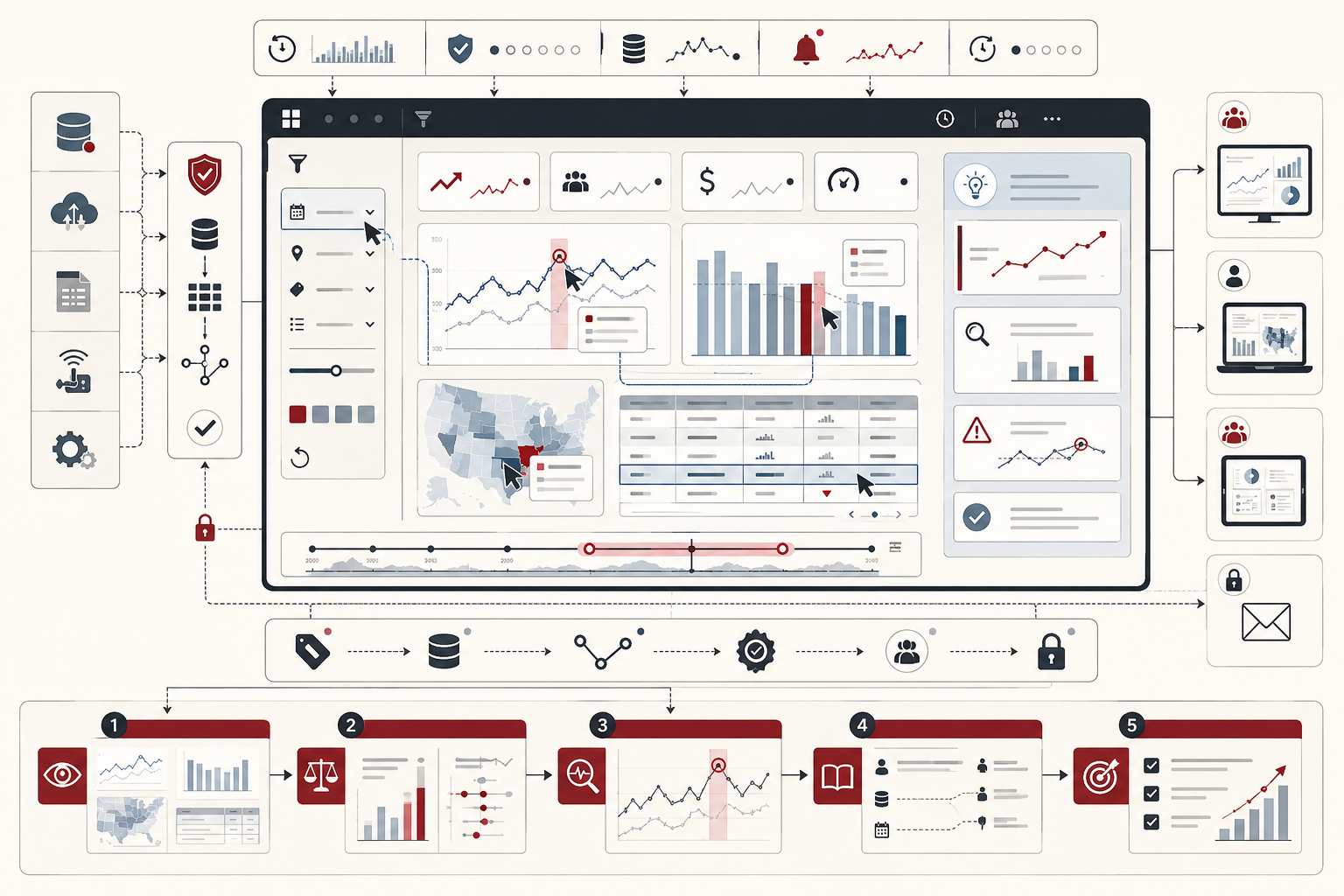
This article builds on the themes developed in Data Visualization and Analytical Communication, Information Design and Analytical Reporting, Descriptive Analytics and Data Exploration, Reproducible Analytics and Versioned Data Workflows, Metadata, Data Catalogs, and Lineage, Data Quality Metrics and Observability, and Data Governance and Stewardship. If visualization explains how patterns become visible, and reporting explains how evidence becomes durable, dashboards and data stories explain how analytical evidence becomes navigable, interactive, sequenced, and usable in the flow of decision-making.
Dashboards and stories as analytical interfaces
Interactive dashboards and data stories should be understood as analytical interfaces rather than as decorative presentation layers. A dashboard is not merely a screen containing several charts. It is a designed environment in which users monitor conditions, inspect variation, compare segments, identify exceptions, and move from overview to detail. A data story is not merely a sequence of attractive visuals. It is a structured route through evidence that helps an audience understand what matters, why it matters, what support exists, and what uncertainty remains.
This distinction matters because interfaces shape reasoning. A dashboard can guide the user toward meaningful comparison or scatter attention across disconnected tiles. A story can clarify an analytical pattern or push the audience toward a conclusion stronger than the evidence allows. Filters can deepen inquiry or create confusion. Annotations can explain evidence or manufacture emphasis. Drill-downs can preserve context or disorient the user. In every case, the design of the interface influences the interpretation of the evidence.
At a mature level, dashboard and storytelling design belongs inside the same systems logic as data quality, metadata, lineage, governance, reporting, and reproducibility. The interface is the place where many users meet the data system. If the interface hides definitions, obscures filters, omits caveats, overstates certainty, or fails accessibility expectations, then the system can look modern while remaining epistemically weak.
What interactive dashboards and data storytelling mean
Interactive dashboards are visual interfaces that consolidate important information and allow users to inspect that information dynamically through filters, linked views, drill-downs, parameter controls, tooltips, highlighted selections, or other interactive mechanisms. A dashboard usually exists to support recurring use: monitoring, operational review, executive inspection, exception management, quality tracking, risk oversight, or analytical exploration around a defined set of questions.
Data storytelling is the guided communication of analytical findings through a structured combination of visuals, text, sequencing, annotation, comparison, and framing. A data story gives the audience a route through the evidence. It decides what comes first, what pattern deserves attention, what context is necessary, where uncertainty belongs, and how the reader should move from observation to interpretation.
The two modes overlap, but they are not identical. Dashboards are often persistent, user-directed, and reusable. Stories are often directional, author-guided, and explanatory. A dashboard may contain annotated story elements, and a data story may allow limited interaction, but the primary use case should remain clear. When every dashboard tries to be a full story and every story tries to be an exploratory tool, the result is often clutter, ambiguity, and weak analytical focus.
Why interactive analytical communication matters
Interactive analytical communication matters because users rarely approach data with only one fixed question. A product manager may want to know whether usage volume recovered, which segment still shows decline, whether instrumentation changed, and which incident ticket explains the break. A finance leader may want to inspect current revenue variance, compare it with tolerance, filter by region, and open a reconciliation table. A policy team may want to compare scenarios, examine distributional impacts, and review assumptions. Static reporting can communicate selected findings well, but interactive systems allow users to move through related analytical tasks within one environment.
At the same time, interactivity introduces new risks. When users can filter, drill, slice, hover, highlight, and switch modes, the interface itself becomes part of the analytical burden. The user must understand both the evidence and the interaction state. Which filters are active? Which date range is selected? What changed after the click? Does a chart show all records or only a subset? Is a tooltip definition essential? Is a story point author-guided or exploratory? Without clear design, the dashboard becomes a maze rather than an analytical surface.
Good interactive communication therefore requires discipline. It does not maximize features. It organizes interaction around real user questions. It gives users enough control to inspect what matters while preserving stable context, visible state, clear defaults, and interpretive guidance.
Dashboards as monitoring and exploration surfaces
A dashboard’s primary function should be explicit. Some dashboards are built for monitoring: they answer recurring questions such as what changed, what is out of tolerance, where an exception exists, and whether action is needed. Others are built for exploration: they help users compare segments, test hypotheses, or inspect patterns across multiple dimensions. Still others operate as operational status boards, executive briefings, embedded analytics interfaces, or guided story environments.
Monitoring dashboards should usually be concise. They need stable KPIs, visible thresholds, current-state indicators, trend context, exception markers, and paths to detail. Exploratory dashboards may need more controls and linked views, but those controls should still be organized around plausible tasks. A dashboard that tries to display every available measure, filter, and chart usually stops being an interface for judgment and becomes a repository of visual fragments.
This is why dashboard design is not a neutral act of aggregation. It requires deciding what matters repeatedly, what belongs on the surface, what belongs behind drill-down, what should be filtered, and what should not be included at all. Omission is often part of clarity. A dashboard that includes less but supports the main analytical task better is stronger than one that includes more but forces users to reconstruct the logic themselves.
Data storytelling as guided interpretation
Data storytelling begins where unconstrained exploration becomes insufficient. A story gives the audience a path through the evidence. It does not merely show multiple views; it sequences them. It introduces context, highlights a pattern, explains why the pattern matters, addresses uncertainty, and distinguishes evidence from implication.
This sequencing matters because many analytical findings are not self-evident on first inspection. A dashboard may show a variance, but a story explains whether the variance is normal, material, seasonal, policy-relevant, operationally urgent, or uncertain. A chart may show a trend, but a story explains whether the trend changes the decision. A map may show spatial clustering, but a story explains what comparison, denominator, or structural condition makes the clustering meaningful.
Good data storytelling is therefore not a soft alternative to rigorous analysis. It is rigorous communication. It gives evidence a structure that helps readers recover the intended interpretation while still preserving the ability to inspect the support. A strong data story does not force the reader to accept the conclusion. It makes the reasoning path visible enough that the conclusion can be evaluated.
Dashboards, stories, and exploratory interfaces are not the same thing
Dashboards, stories, and exploratory interfaces solve different problems. A dashboard is usually open, persistent, and reusable. A story is usually selective, sequenced, and author-guided. An exploratory interface may be even more flexible, allowing users to generate new views, test multiple filters, compare arbitrary groups, or investigate uncertain hypotheses without one fixed conclusion.
Many failed analytical products confuse these modes. They become too dense to tell a story, too controlled to support exploration, and too cluttered to function as a monitoring dashboard. A dashboard with too many narrative callouts may obscure current-state monitoring. A story with too many filters may lose its interpretive line. An exploratory interface forced into a compact KPI dashboard may frustrate serious analysis.
The stronger design move is to choose the primary mode and let secondary modes support it. A monitoring dashboard can include a small annotated explanation for recent anomalies. A story can include a limited interaction at a key moment. An exploratory tool can contain saved views that later become dashboard components. But the user should never have to guess what kind of analytical product they are using.
| Mode | Primary purpose | Design emphasis |
|---|---|---|
| Monitoring dashboard | Support recurring inspection of current state, trends, thresholds, and exceptions | Few high-value views, stable KPIs, visible context, and clear alert paths |
| Exploratory dashboard | Support user-directed comparison, filtering, segmentation, and hypothesis inspection | Useful controls, linked views, reset options, and clear interaction state |
| Data story | Guide an audience through evidence toward an interpretation or decision context | Sequence, annotation, claim support, uncertainty, and narrative discipline |
| Operational interface | Support fast detection, triage, and response in live or recurring workflows | Status, alerts, incident detail, ownership, and next-action clarity |
| Analytical workbench | Support broad exploration and flexible investigation by expert users | Flexible controls, saved states, queryability, and deeper analytical affordances |
Interactivity, filters, and analytical control
Interactivity gives users analytical control, but not every control improves the interface. Filters, highlights, parameter toggles, tooltips, linked brushing, drill-downs, and story navigation can make a dashboard powerful when they align with real tasks. They become harmful when they create friction, hide important defaults, or produce many alternative views without interpretive anchors.
Good filter design starts from user questions. Does the user need to compare time periods, regions, segments, products, cohorts, scenarios, facilities, suppliers, or risk classes? Does the control support that task directly? Is the default state visible? Can the user reset? Does the interface show what is currently selected? Does filtering one view change another view in a predictable way? These details are not minor usability issues. They determine whether the user can reason about the evidence.
Interactivity should reduce ambiguity, not add it. The strongest control is often not the one that maximizes freedom, but the one that supports the most important question with the least confusion. In high-trust dashboards, interaction state should be visible enough that a screenshot or export can still be interpreted later.
Layout, visual hierarchy, and cognitive focus
Interactive dashboards are especially sensitive to layout because users must often interpret multiple elements at once. Every chart, KPI card, filter, legend, map, tooltip, table, and annotation competes for attention. The dashboard’s layout should therefore create a clear reading order: where to look first, what is secondary, what is detail, and how the parts relate.
Visual hierarchy is not decoration. It is a reasoning aid. KPI cards should not compete equally with diagnostic tables unless both are equally important. Detail should not overwhelm overview. Filters should be grouped and labeled so users understand how control works. Alerts should be visible without becoming visually hysterical. Tables should be placed where exact lookup is necessary, not where pattern recognition is the main task.
Poor hierarchy forces users to solve the interface before they can interpret the evidence. Good hierarchy lets users preserve cognitive effort for the analytical question. In that sense, dashboard design is cognitive infrastructure. It protects attention for interpretation.
KPIs, context, and the problem of naked metrics
One of the most common weaknesses in dashboards is the presentation of naked metrics: isolated KPI values without baseline, target, denominator, trend, comparator, uncertainty, or threshold. A number alone rarely tells the user what to think. Is it high or low? Relative to what? Is it improving? Is it expected? Does it vary by segment? Is the denominator stable? Does the metric definition match the user’s assumption?
Good dashboards surround KPIs with enough context to make them meaningful. That may include prior-period comparison, target variance, historical trend, expected range, tolerance threshold, peer comparison, subgroup breakdown, or explanatory note. Context does not always require more visual complexity. Sometimes a small sparkline, target marker, label, or caption is enough. The key is that the user should not be forced to infer the interpretive frame from memory.
This is where semantic governance meets interface design. A KPI is only as trustworthy as the definition, baseline, refresh state, and intended use that accompany it. A beautifully displayed metric with an ambiguous definition remains analytically weak.
Linked views, drill-down, and progressive disclosure
One of the most powerful dashboard patterns is the use of linked views. A high-level summary chart can drive detail tables, subgroup distributions, maps, trend lines, or event records when the user clicks or filters. This creates progressive disclosure: the dashboard does not show everything at once, but it allows deeper detail to surface when the user asks for it.
Progressive disclosure helps solve the central dashboard tension between overview and detail. Users need enough summary to orient themselves and enough detail to investigate. Showing all detail at once creates clutter. Hiding all detail creates shallow reporting. Linked views allow the dashboard to preserve the overview while making detail available in context.
But drill-down can also fail. If clicking a chart changes multiple panels without visible explanation, users may lose orientation. If detail views do not preserve the selected context, users may misread the subset. If linked views are too numerous, the interaction becomes brittle. Good drill-down design should feel like deepening the same question, not jumping into a different interpretive world.
Cognitive load, mode switching, and analytical friction
Interactive systems carry a special cognitive burden because users must interpret both the data and the interface. Every extra filter, tab, hover state, parameter, legend, drill path, and story control increases what the user must hold in working memory. This is why dashboard clutter is not merely aesthetic noise. It directly competes with analytical comprehension.
Mode switching is one of the most common causes of dashboard fatigue. A user may move from monitoring a KPI to filtering a segment, then to reading a tooltip, then to opening a detail table, then to returning to the overview without a stable sense of what changed. The more the interface asks users to remember, the less attention remains for interpretation.
Good design reduces analytical friction. Stable defaults, visible selections, grouped filters, clear reset paths, predictable linked views, and restrained interactivity are not conservative design habits. They are ways of protecting the user’s reasoning capacity for the evidence itself.
Annotation, story points, and explanatory framing
Annotation is the bridge between analytical surface and analytical meaning. A user may be able to explore a dashboard freely and still miss the main point. Titles, subtitles, captions, callouts, threshold notes, story points, and explanatory sidebars help ensure that important findings do not remain hidden behind interface freedom.
Story points are especially useful when the author needs to guide the audience through a sequence. The first point may establish context. The second may reveal a pattern. The third may compare alternatives. The fourth may qualify the finding. The final point may distinguish conclusion, implication, and action. This structure supports interpretation without requiring the audience to discover every step independently.
Annotation should clarify, not decorate. A strong annotation links a claim to visible evidence and explains why the evidence matters. A weak annotation merely labels the chart or pushes the reader toward a conclusion stronger than the data supports. Narrative emphasis must remain proportionate to evidence.
A mathematical lens for dashboard and story integrity
Interactive dashboards and data stories can also be evaluated through a mathematical lens. The goal is not to reduce design judgment to a simplistic score, but to make the dimensions of interface integrity explicit. A dashboard becomes stronger when KPIs have context, views are focused, interaction state is visible, story points are coherent, annotations link to evidence, accessibility checks pass, governance is active, and claims remain traceable.
D_i = w_K K_i + w_V V_i + w_F F_i + w_L L_i + w_S S_i + w_A A_i + w_G G_i + w_E E_i
\]
Interpretation: Dashboard integrity \(D_i\) for dashboard \(i\) can be modeled as a weighted combination of KPI context \(K_i\), view focus \(V_i\), filter and interaction clarity \(F_i\), linked-view quality \(L_i\), story coherence \(S_i\), accessibility \(A_i\), governance review \(G_i\), and evidence traceability \(E_i\).
The weights should be explicit:
w_K + w_V + w_F + w_L + w_S + w_A + w_G + w_E = 1
\]
Interpretation: A monitoring dashboard may weight KPI context and view focus heavily, while a guided data story may weight story coherence, annotation quality, and evidence traceability more heavily.
Interaction burden can be represented as a penalty:
B_i = \alpha C_i + \beta H_i + \gamma M_i
\]
Interpretation: Interaction burden \(B_i\) rises with control count \(C_i\), hidden state \(H_i\), and mode switching \(M_i\). More interactivity is not automatically better if it increases the cognitive cost of interpretation.
KPI context can be evaluated directly:
K_i = \frac{B_i^{*} + T_i + R_i + N_i}{4}
\]
Interpretation: KPI context \(K_i\) improves when a metric includes a baseline \(B_i^{*}\), target or threshold \(T_i\), recent trend \(R_i\), and denominator or population frame \(N_i\). A KPI without context may look precise while remaining difficult to interpret.
Dashboard risk can be modeled as the gap between consequence and integrity:
H_i = C_i^{*}(1 – D_i)
\]
Interpretation: Dashboard risk \(H_i\) rises when a dashboard is consequential \(C_i^{*}\) but has weak integrity \(D_i\). A board-level dashboard, public dashboard, operational alerting surface, or high-impact model-monitoring dashboard should meet stronger integrity controls than a low-stakes exploratory workspace.
This lens changes the design review from taste-based critique to accountable interface assessment. The question becomes: which KPIs lack context, which controls create friction, which story points lack evidence, which views overload attention, which caveats are hidden, and which dashboards are not safe to treat as trusted decision surfaces?
Python Workflow: Dashboard and Storytelling Integrity Scorecard
The following Python workflow shows how a dashboard and storytelling program can evaluate KPI context, view focus, interaction clarity, interaction burden, linked-view quality, story coherence, annotation quality, accessibility, governance review, and evidence traceability.
#!/usr/bin/env python3
"""
Python Workflow: Dashboard and Data Storytelling Integrity Scorecard

This compact workflow evaluates interactive analytical products as
evidence-bearing interfaces rather than as simple chart collections.
"""

from __future__ import annotations

from dataclasses import dataclass


@dataclass
class DashboardSignals:
    kpi_context: float
    view_focus: float
    interaction_clarity: float
    interaction_burden: float
    linked_view_quality: float
    story_coherence: float
    annotation_quality: float
    accessibility: float
    governance: float
    evidence_traceability: float


def dashboard_integrity_score(signals: DashboardSignals) -> float:
    return round(
        0.14 * signals.kpi_context
        + 0.12 * signals.view_focus
        + 0.12 * signals.interaction_clarity
        + 0.10 * signals.interaction_burden
        + 0.12 * signals.linked_view_quality
        + 0.10 * signals.story_coherence
        + 0.10 * signals.annotation_quality
        + 0.08 * signals.accessibility
        + 0.07 * signals.governance
        + 0.05 * signals.evidence_traceability,
        3,
    )


def dashboard_integrity_gap(signals: DashboardSignals) -> float:
    return round(1.0 - dashboard_integrity_score(signals), 3)


def main() -> None:
    examples = {
        "executive_revenue_monitoring_dashboard": DashboardSignals(
            kpi_context=1.0,
            view_focus=1.0,
            interaction_clarity=0.95,
            interaction_burden=1.0,
            linked_view_quality=0.95,
            story_coherence=0.85,
            annotation_quality=1.0,
            accessibility=1.0,
            governance=1.0,
            evidence_traceability=1.0,
        ),
        "customer_360_exploration_dashboard": DashboardSignals(
            kpi_context=0.80,
            view_focus=0.76,
            interaction_clarity=0.72,
            interaction_burden=0.68,
            linked_view_quality=0.70,
            story_coherence=0.80,
            annotation_quality=0.70,
            accessibility=0.60,
            governance=0.70,
            evidence_traceability=0.80,
        ),
        "legacy_kpi_dashboard": DashboardSignals(
            kpi_context=0.20,
            view_focus=0.40,
            interaction_clarity=0.25,
            interaction_burden=0.35,
            linked_view_quality=0.25,
            story_coherence=0.40,
            annotation_quality=0.15,
            accessibility=0.00,
            governance=0.20,
            evidence_traceability=0.30,
        ),
    }

    for dashboard_id, signals in examples.items():
        print(
            dashboard_id,
            "dashboard_integrity_score=",
            dashboard_integrity_score(signals),
            "dashboard_integrity_gap=",
            dashboard_integrity_gap(signals),
        )


if __name__ == "__main__":
    main()
This workflow separates interactivity from integrity. A dashboard can contain many filters and still be weak if users cannot see active state, recover definitions, understand caveats, or trace claims to evidence. Conversely, a restrained dashboard can be powerful if its questions, controls, views, annotations, and governance context are clear.
R Workflow: Dashboard, KPI, Filter, Story, Annotation, Accessibility, and Governance Summary
The following R workflow summarizes dashboard types, KPI definition status, filter complexity, visual purpose, story-point structure, annotation quality, interaction friction, accessibility checks, and governance review status. It supports a recurring dashboard integrity review: which dashboards are approved, which KPIs lack context, which controls add friction, which views carry design risk, and which accessibility or governance issues remain unresolved?
#!/usr/bin/env Rscript

# R Workflow: Dashboard, KPI, Filter, Story, Annotation,
# Accessibility, and Governance Summary

dashboards <- data.frame(
  dashboard_id = c("dash001", "dash002", "dash003", "dash004", "dash005"),
  dashboard_type = c(
    "monitoring",
    "exploratory",
    "guided_story",
    "operational_monitoring",
    "legacy_reporting"
  ),
  status = c("approved", "in_review", "in_review", "approved", "needs_revision"),
  refresh_cadence = c("daily", "daily", "weekly", "hourly", "monthly"),
  view_count = c(3, 5, 4, 3, 8),
  filter_count = c(3, 7, 4, 4, 9),
  stringsAsFactors = FALSE
)

kpis <- data.frame(
  kpi_id = c("kpi001", "kpi002", "kpi003", "kpi004", "kpi005", "kpi006"),
  definition_status = c("approved", "approved", "approved", "review", "review", "approved"),
  certification_status = c("certified", "certified", "reviewed", "reviewed", "reviewed", "certified"),
  baseline_present = c(TRUE, TRUE, TRUE, TRUE, TRUE, TRUE),
  target_present = c(TRUE, TRUE, FALSE, TRUE, TRUE, TRUE),
  trend_present = c(TRUE, TRUE, TRUE, TRUE, TRUE, TRUE),
  denominator_present = c(TRUE, TRUE, TRUE, TRUE, TRUE, TRUE),
  stringsAsFactors = FALSE
)

filters <- data.frame(
  filter_id = c("flt001", "flt002", "flt003", "flt004", "flt005"),
  filter_type = c("dropdown", "dropdown", "multiselect", "range_slider", "multiselect"),
  complexity_level = c("low", "medium", "medium", "medium", "high"),
  default_state_visible = c(TRUE, TRUE, TRUE, TRUE, FALSE),
  reset_available = c(TRUE, TRUE, TRUE, TRUE, TRUE),
  stringsAsFactors = FALSE
)

views <- data.frame(
  view_id = c("view001", "view002", "view003", "view004", "view005"),
  visual_type = c("kpi_cards", "line_chart", "table", "bar_chart", "matrix"),
  purpose = c("status_summary", "trend", "exact_lookup", "comparison", "tradeoff_comparison"),
  design_risk = c("low", "low", "low", "medium", "medium"),
  caption_quality = c("approved", "approved", "approved", "in_review", "in_review"),
  stringsAsFactors = FALSE
)

stories <- data.frame(
  story_point_id = c("sp001", "sp002", "sp003", "sp004"),
  story_function = c("context", "pattern", "tradeoff", "status"),
  uncertainty_visible = c(TRUE, TRUE, TRUE, TRUE),
  stringsAsFactors = FALSE
)

accessibility <- data.frame(
  check_id = c("acc001", "acc002", "acc003", "acc004", "acc005"),
  check_type = c(
    "color_not_only_signal",
    "keyboard_navigation",
    "color_not_only_signal",
    "tooltip_dependency",
    "color_contrast"
  ),
  status = c("pass", "pass", "warn", "warn", "pass"),
  severity = c("high", "medium", "high", "medium", "high"),
  stringsAsFactors = FALSE
)

dashboard_summary <- aggregate(
  dashboard_id ~ dashboard_type + status + refresh_cadence,
  data = dashboards,
  FUN = length
)
names(dashboard_summary) <- c(
  "dashboard_type",
  "status",
  "refresh_cadence",
  "dashboard_count"
)

kpi_summary <- aggregate(
  kpi_id ~ definition_status + certification_status,
  data = kpis,
  FUN = length
)
names(kpi_summary) <- c(
  "definition_status",
  "certification_status",
  "kpi_count"
)

filter_summary <- aggregate(
  filter_id ~ filter_type + complexity_level + default_state_visible + reset_available,
  data = filters,
  FUN = length
)
names(filter_summary) <- c(
  "filter_type",
  "complexity_level",
  "default_state_visible",
  "reset_available",
  "filter_count"
)

view_summary <- aggregate(
  view_id ~ visual_type + purpose + design_risk + caption_quality,
  data = views,
  FUN = length
)
names(view_summary) <- c(
  "visual_type",
  "purpose",
  "design_risk",
  "caption_quality",
  "view_count"
)

story_summary <- aggregate(
  story_point_id ~ story_function + uncertainty_visible,
  data = stories,
  FUN = length
)
names(story_summary) <- c(
  "story_function",
  "uncertainty_visible",
  "story_point_count"
)

accessibility_summary <- aggregate(
  check_id ~ check_type + status + severity,
  data = accessibility,
  FUN = length
)
names(accessibility_summary) <- c(
  "check_type",
  "status",
  "severity",
  "check_count"
)

dir.create("outputs", showWarnings = FALSE, recursive = TRUE)

write.csv(dashboard_summary, "outputs/dashboard_summary_r.csv", row.names = FALSE)
write.csv(kpi_summary, "outputs/kpi_summary_r.csv", row.names = FALSE)
write.csv(filter_summary, "outputs/filter_summary_r.csv", row.names = FALSE)
write.csv(view_summary, "outputs/view_summary_r.csv", row.names = FALSE)
write.csv(story_summary, "outputs/story_summary_r.csv", row.names = FALSE)
write.csv(accessibility_summary, "outputs/accessibility_summary_r.csv", row.names = FALSE)

cat("Wrote dashboard, KPI, filter, story, view, and accessibility summaries.\n")
This workflow treats dashboards as inspectable analytical products. It does not only count dashboards. It asks whether the dashboard mode is clear, whether KPIs have context, whether filters create friction, whether views fit their purpose, whether stories make uncertainty visible, and whether accessibility checks are passing.
Accessibility, trust, and responsible interaction design
Interactive dashboards must be accessible and trustworthy. Users should be able to understand the dashboard without relying only on color, hover states, hidden tooltips, tiny legends, or assumed platform fluency. Important definitions should not be available only when a user hovers with a mouse. Color should not be the only signal of status, risk, performance, or alert level. Controls should be readable, reachable, and understandable for users with different abilities and levels of technical expertise.
Trust also depends on interface state. Users need to know what filters are active, what date range is shown, what refresh state applies, what definitions are in force, and whether a metric is certified or provisional. Without that visibility, dashboards can produce false confidence. They may look current, complete, and authoritative even when the view is filtered, stale, experimental, or restricted to a partial population.
Responsible interaction design is therefore a governance issue. A dashboard that supports high-impact decisions should make its assumptions, limits, definitions, and controls visible enough for users to interpret outputs correctly. Accessibility is not only a legal or usability concern. It is part of fair analytical access.
Dashboards and storytelling in the analytical workflow
Dashboards and data stories belong at different points in the analytical workflow. Dashboards often support monitoring, repeated inspection, operational review, and self-service exploration. Stories often support interpretation, organizational alignment, executive explanation, policy argument, or communication of a key finding. In practice, the strongest analytical environments often connect the two: a dashboard for ongoing inquiry and a story for explaining what the evidence means at a particular moment.
This means interactive communication should be designed as part of the workflow rather than as an afterthought. The question is not simply how to display results, but where the user enters the reasoning process and what support they need. Does the user need current state, historical comparison, anomaly explanation, scenario guidance, or decision support? Does the dashboard need to persist as a monitoring surface, or does the organization need a story artifact that preserves the reasoning behind a recommendation?
Dashboards sustain inquiry. Stories stabilize meaning. Analytical workflows need both when the evidence must be explored, communicated, defended, and remembered.
Governance, metadata, lineage, and dashboard integrity
Dashboards often become the most visible layer of a data system, which means they can also become the most visible source of trust or distrust. A dashboard should not be treated as trustworthy merely because it looks polished. It should be connected to governed metrics, certified definitions, source assets, refresh metadata, ownership, lineage, quality signals, and review status.
This is where dashboards connect directly to Metadata, Data Catalogs, and Lineage, Data Governance and Stewardship, and Data Quality Metrics and Observability. A dashboard is stronger when users can see what metric definitions apply, whether the data is fresh, which filters are active, whether an alert is based on a certified threshold, and what source assets feed the view. A story is stronger when each claim links to evidence, method, caveat, and review status.
In mature environments, dashboards should be cataloged, versioned, reviewed, and stewarded like other analytical products. They are not informal visual layers. They are decision-support artifacts that can shape resource allocation, public communication, operational response, policy choices, and model governance. Their integrity deserves the same seriousness.
Failure modes in dashboards and data stories
Interactive dashboards and data stories fail in recognizable ways. One failure mode is dashboard clutter: too many charts, filters, colors, legends, cards, tabs, and controls competing for attention. Another is mode confusion, where a dashboard tries to be a monitoring surface, exploratory workbench, and guided story at the same time. A third is hidden state, where users cannot easily tell what filters, date ranges, assumptions, or subsets are active.
A fourth failure mode is naked metrics: KPIs displayed without baseline, target, denominator, trend, or definition. A fifth is tooltip dependency, where essential meaning is hidden in hover states. A sixth is narrative overreach, where the story emphasizes a conclusion more strongly than the evidence supports. A seventh is accessibility neglect, where color, hover, or layout choices exclude users or distort interpretation. An eighth is governance invisibility, where users cannot tell whether a dashboard is certified, reviewed, experimental, stale, or deprecated.
These are not only design problems. They are analytical integrity problems. A dashboard can be visually modern and still make warranted interpretation difficult. A data story can be persuasive and still be epistemically weak. High-quality interactive communication preserves both usability and evidence discipline.
Applications across domains
Interactive dashboards and data storytelling matter across many domains. In operations, they support monitoring, incident response, exception management, and service reliability. In public policy, they help communicate trends, disparities, resource constraints, and program outcomes. In business, they support KPI tracking, segmentation, forecasting, executive review, and customer or supplier analysis. In machine learning, dashboards help users inspect model performance, calibration, threshold tradeoffs, drift, fairness metrics, and monitoring signals. In sustainability and infrastructure, dashboards can track emissions, risk indicators, facility conditions, resilience metrics, or environmental monitoring outputs.
Across all these domains, the central question remains the same: does the interface help users investigate and understand evidence in a way that supports justified action? A dashboard that supports repeated operational judgment, a story that communicates a policy tradeoff, and a monitoring interface for model drift all require different designs. But all require clarity, context, accessibility, traceability, and responsible emphasis.
Implementation principles for high-integrity dashboard and story design
Start with dashboard mode. Decide whether the product is primarily for monitoring, exploration, guided storytelling, operational response, or expert analysis. The interface should not hide its purpose.
Limit views to what supports the primary task. More charts do not automatically mean more insight. Use linked views and drill-downs rather than forcing all detail onto the main surface.
Make interaction state visible. Active filters, selected dates, comparison groups, and reset paths should be clear.
Give KPIs context. Important metrics need baseline, target, trend, denominator, definition, or threshold.
Use progressive disclosure. Preserve overview while allowing detail to surface when the user asks for it.
Use annotation responsibly. Annotations should clarify evidence, not decorate the screen or overstate the finding.
Place uncertainty where it matters. Caveats should appear near the relevant KPI, chart, story point, or claim.
Design for accessibility from the start. Do not rely only on color, hover, or dense visual encodings. Use readable labels, redundant cues, and stable text.
Connect dashboards to governance. Show refresh state, source definitions, certification status, data quality warnings, and responsible owners where relevant.
Review dashboards like analytical products. Consequential dashboards should have stewardship, versioning, review checkpoints, and evidence links.
| Control | Purpose | Failure it prevents |
|---|---|---|
| Dashboard mode declaration | Clarifies whether the product is for monitoring, exploration, story, or operations | Mode confusion and overloaded analytical products |
| KPI context review | Checks for baseline, target, trend, denominator, and certified definition | Naked metrics and misleading at-a-glance interpretation |
| View-count discipline | Preserves visual hierarchy and cognitive focus | Dashboard clutter and loss of big-picture interpretation |
| Filter-state visibility | Makes defaults, selections, and reset paths clear | Hidden subsets and ambiguous dashboard screenshots |
| Progressive disclosure | Links overview to detail without displaying everything at once | Overloaded interfaces and detail-starved dashboards |
| Story-point traceability | Links narrative claims to views, source assets, methods, and caveats | Persuasive stories unsupported by visible evidence |
| Accessibility checks | Reviews color, labels, hover dependency, keyboard access, and readability | Interfaces that exclude users or hide meaning |
| Governance review | Connects dashboards to certified metrics, refresh state, ownership, and lineage | Polished but ungoverned decision-support surfaces |
GitHub Repository
This article can be paired with a companion code workflow that models dashboards and data stories as governed analytical interfaces. The example includes dashboard inventories, KPI definitions, filter controls, linked views, story points, annotations, interaction events, accessibility checks, governance checks, evidence links, SQL schemas, scorecard scripts, typed contracts, Quarto report templates, a static dashboard mockup, design checklists, and multi-language examples across Python, R, Julia, SQL, Go, Rust, C, C++, TypeScript, HTML, and Terraform placeholders.
The companion repository provides a vendor-neutral interactive dashboards and data storytelling scaffold with dashboard integrity scoring, KPI context review, filter-burden analysis, story-point traceability, accessibility checks, governance review, SQL dashboard queries, reproducible reporting templates, typed contracts, documentation, and CI smoke-test patterns.
Conclusion
Interactive dashboards and data storytelling are central to modern analytical communication because they shape how people monitor, explore, interpret, and act on evidence. Dashboards provide reusable analytical surfaces for current-state awareness, comparison, exception detection, and investigation. Data stories provide guided sequences that help audiences understand why a pattern matters and how evidence supports a claim. Both can strengthen analytical practice when they are designed with clarity, context, accessibility, governance, and traceability.
The deeper point is that interactivity does not guarantee understanding, and storytelling does not guarantee truth. Dashboards can overwhelm users, hide assumptions, and create false confidence. Stories can clarify evidence or overstate it. High-integrity interactive communication makes the user’s task easier without weakening the evidence. It preserves context, shows state, links claims to support, places uncertainty where it matters, and treats dashboard interfaces as serious analytical products. In data-intensive organizations, that is not merely a visualization skill. It is a condition of responsible decision support.
Related articles
- Data Systems and Analytics knowledge series
- Data Visualization and Analytical Communication
- Information Design and Analytical Reporting
- Descriptive Analytics and Data Exploration
- Model Evaluation and Performance Metrics
- Data Quality Metrics and Observability
- Metadata, Data Catalogs, and Lineage
- Data Governance and Stewardship
Further reading
- Cairo, A. (2016) The Truthful Art: Data, Charts, and Maps for Communication. Berkeley: New Riders.
- Few, S. (2013) Information Dashboard Design: Displaying Data for At-a-Glance Monitoring. 2nd edn. Burlingame, CA: Analytics Press.
- Knaflic, C.N. (2015) Storytelling with Data: A Data Visualization Guide for Business Professionals. Hoboken: Wiley.
- Tufte, E.R. (2001) The Visual Display of Quantitative Information. 2nd edn. Cheshire, CT: Graphics Press.
- Wickham, H., Çetinkaya-Rundel, M. and Grolemund, G. (2023) R for Data Science. 2nd edn. Sebastopol, CA: O’Reilly Media.
- Wilke, C.O. (2019) Fundamentals of Data Visualization. Sebastopol, CA: O’Reilly Media.
References
- Cairo, A. (2016) The Truthful Art: Data, Charts, and Maps for Communication. Berkeley: New Riders.
- Few, S. (2004) Dashboard Confusion. Available at: https://www.perceptualedge.com/articles/ie/dashboard_confusion.pdf
- Few, S. (2013) Information Dashboard Design: Displaying Data for At-a-Glance Monitoring. 2nd edn. Burlingame, CA: Analytics Press.
- Few, S. (2015) Dashboard Design. Available at: https://www.perceptualedge.com/files/Dashboard_Design_Course.pdf
- Knaflic, C.N. (2015) Storytelling with Data: A Data Visualization Guide for Business Professionals. Hoboken: Wiley.
- Nielsen Norman Group (2017) Dashboards: Making Charts and Graphs Easier to Understand. Available at: https://www.nngroup.com/articles/dashboards-preattentive/
- Nielsen Norman Group (2022) Choosing a Chart Type: Consider Context. Available at: https://www.nngroup.com/articles/choosing-chart-types/
- Quarto (n.d.) Quarto: An Open-Source Scientific and Technical Publishing System. Available at: https://quarto.org/
- Tableau (n.d.) Best Practices for Effective Dashboards. Available at: https://help.tableau.com/current/pro/desktop/en-us/dashboards_best_practices.htm
- Tableau (n.d.) Best Practices for Telling Great Stories. Available at: https://help.tableau.com/current/pro/desktop/en-us/story_best_practices.htm
- Tableau (n.d.) Stories. Available at: https://help.tableau.com/current/pro/desktop/en-us/stories.htm
- Tufte, E.R. (2001) The Visual Display of Quantitative Information. 2nd edn. Cheshire, CT: Graphics Press.
- Wickham, H., Çetinkaya-Rundel, M. and Grolemund, G. (2023) Communicate. In: R for Data Science. Available at: https://r4ds.hadley.nz/communicate.html
- Wilke, C.O. (2019) Fundamentals of Data Visualization. Sebastopol, CA: O’Reilly Media.